
Why this category matters
LinkedIn is the most consequential channel in B2B today, but it is also the most fragile. Send too many connection requests in a week and your account gets restricted. Personalise badly and your reply rates collapse. The whole category of LinkedIn automation tools tools exists to solve a single tension: how do you run outbound at scale without burning the platform that gives you access to the buyer in the first place?
Expandi is one of the more talked-about tools in this space. In this review we look at what it actually does, who it is genuinely a fit for, where the trade-offs sit, and how it compares to the alternatives most B2B teams evaluate alongside it.
This guide is written from the perspective of an operator. We have worked with B2B teams across SaaS, services and enterprise running these tools at scale, and the framework below is the same one we use internally before recommending a platform to a client at bratz digital.
What Expandi actually is
A cloud-based LinkedIn automation platform built for safe, smart outbound at scale. That is the marketing line, but the more useful framing is this: Expandi sits in the part of a B2B revenue stack where you orchestrate human-feeling outbound on LinkedIn at a pace a single SDR cannot match manually.
For teams that match its sweet spot — agencies and b2b sales teams running multi-channel linkedin + email sequences across many accounts. — it earns its place quickly. For teams that do not, it usually shows up as either an under-utilised line item or a frustrating mismatch with how the team actually operates.
Best fit
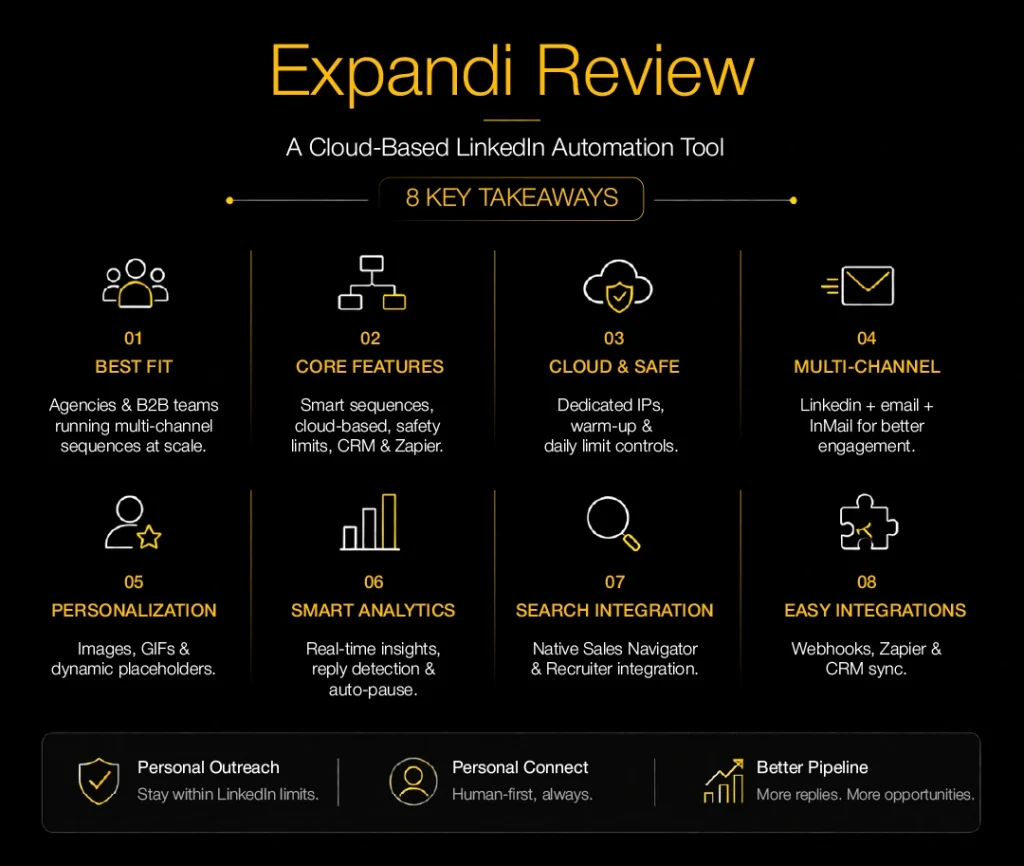
Agencies and B2B sales teams running multi-channel LinkedIn + email sequences across many accounts.
Feature deep-dive
Marketing pages tend to list features as bullet points. The more useful question is what each feature unlocks in practice. Here is how the core Expandi capabilities translate into operational reality:
Cloud-based execution with dedicated country-based IP per account
In day-to-day use this is one of the features SDRs notice first. It removes a manual step that would otherwise eat 20-30 minutes a day per rep.
Smart sequences combining connection requests, messages, InMail and email steps
This is where Expandi earns its keep against cheaper alternatives. Done well, it is the difference between a campaign that books meetings and one that gets ignored.
Hyper-personalization with images, GIFs and dynamic placeholders
The depth here matters more than the surface description. Compare implementations carefully — two tools can claim the same capability and deliver very different results.
Built-in Sales Navigator + Recruiter search integration
Often overlooked at evaluation time, this becomes important once volume increases. We recommend testing it explicitly during the trial.
Webhooks and Zapier for CRM sync
This is table-stakes for the category in 2026. Make sure the implementation is bi-directional and well-documented before you commit.
Daily activity limits to stay within LinkedIn’s safety thresholds
For agencies and multi-account teams this can be the deciding factor. Solo operators can usually live without it.
Where it shines: real-world use cases
Tools rarely fail because of missing features. They fail because they are deployed against the wrong use case. The use cases below are the ones where Expandi consistently delivers value:
Agencies managing outbound for multiple clients from a single dashboard
Teams running this play with Expandi typically see the biggest impact in the first 60 days when message-market fit is dialled in. The tool is the lever; the messaging is still the work.
Founders nurturing inbound LinkedIn connections into demo conversations
Teams running this play with Expandi typically see the biggest impact in the first 60 days when message-market fit is dialled in. The tool is the lever; the messaging is still the work.
ABM teams pairing LinkedIn touches with cold email steps
Teams running this play with Expandi typically see the biggest impact in the first 60 days when message-market fit is dialled in. The tool is the lever; the messaging is still the work.
How to evaluate it against alternatives
When B2B teams shortlist Expandi, they usually evaluate it alongside Dripify, Heyreach and Waalaxy. The right way to compare is not feature-for-feature but to score each option against the criteria that actually matter for your motion. We use this checklist:
- Cloud-based vs Chrome extension (cloud is safer and more reliable)
- Daily limit controls and warm-up logic
- Multi-channel (LinkedIn + email + calls) vs LinkedIn-only
- Native CRM integration depth
- Per-seat pricing and unlimited-sender options for agencies
- Reply detection and auto-pause logic
Our recommendation
Score each shortlisted tool from 1-5 against the criteria above, weighted by what matters to your team. The winner on the spreadsheet is rarely the most-hyped option — it is the one that fits how you actually run revenue.
Implementation: the first 30 days
Buying a tool is the easy part. The teams that get value from Expandi (or any tool in this category) follow a consistent rollout pattern. Here is the sequence we recommend in the first 30 days:
Warm up the LinkedIn account first
Before any automation runs, the account should have a complete profile, a real network, recent activity and ideally some recent content. Cold accounts that suddenly start sending 100 connection requests a day get restricted fast.
Define the ICP search inside Sales Navigator
All these tools are only as good as the search you feed them. Build the Sales Nav search with explicit firmographics, role seniority and exclusion lists. Save the search and reuse it across campaigns.
Write three message variants per step
Connection note, first follow-up after acceptance, and the second nudge. Avoid the ‘pitch on connect’ anti-pattern. The connect message should be a reason to talk; the follow-ups should add a thought, a resource or a question.
Set conservative daily limits
Most teams over-send in the first two weeks and pay for it. Stay under 20-25 connection requests per day for a new sequence. Scale gradually as your acceptance rate stabilises.
Wire replies straight into your CRM
The whole point of automation is to free your reps for the conversations the bot cannot have. If positive replies stay locked inside the tool, you have built another silo. Use webhooks or native integrations to push replies into HubSpot, Salesforce or your CRM of choice.
Pros and cons in plain language
Every tool involves trade-offs. The most useful pros and cons are the ones written from the perspective of a team that has actually run the platform for six months, not from a launch-day blog post.
✓ Cloud-based — no machine has to stay online
This shows up consistently in operator reviews and matches our experience deploying the tool with B2B clients.
✓ Strong safety controls and warm-up logic
This shows up consistently in operator reviews and matches our experience deploying the tool with B2B clients.
✓ Smart Sequences allow true if/then branching
This shows up consistently in operator reviews and matches our experience deploying the tool with B2B clients.
× Pricing is per seat and adds up fast
Worth weighing carefully — this is the kind of constraint that becomes painful at month six, not month one.
× Learning curve for first-time outbound operators
Worth weighing carefully — this is the kind of constraint that becomes painful at month six, not month one.
Pricing and total cost of ownership
Public pricing for Expandi starts at Starts around $99/seat/month. The headline number is rarely the real cost. Add the implementation effort, the data add-ons, the managed-service layer if you need it, and the opportunity cost of the rollout itself.
For a realistic total-cost-of-ownership view, multiply the per-seat price by your team size, add 20-30% for add-ons, and budget 4-8 weeks of internal time for implementation. That number is what should go into your business case.
Verdict
Expandi is a solid pick if your motion looks like the “best for” profile. It is not the right pick if you need a tool to do everything — almost no platform in this category is. The category leaders, including Expandi, now do the core job well; the differentiation is at the edges.
Whichever LinkedIn automation tool you pick, treat the platform itself as a finite resource. Stay well inside daily limits, keep your messaging genuinely personal, and remember that your LinkedIn account is an asset you cannot replace if it gets restricted. The right tool helps you move faster without losing that asset.
If you want help designing the right GTM stack and the campaigns that run on top of it, that is what we do at bratz digital. Explore our work in B2B SEO, performance ads, ABM and outreach — or read the full category pillar for the side-by-side comparison.
Frequently asked questions
Is Expandi worth it in 2026?
If your team matches the “best for” profile (agencies and b2b sales teams running multi-channel linkedin + email sequences across many accounts.), yes — Expandi is worth a serious evaluation. The category has consolidated and the leaders, including Expandi, now offer enough depth to run a real motion. The question is fit, not quality.
What does Expandi integrate with?
Most modern revenue tools integrate with the major CRMs (Salesforce, HubSpot, Pipedrive), the major calendar systems and Zapier or webhooks for everything else. Expandi follows the same pattern. Before you commit, confirm the depth of the CRM sync — bi-directional vs one-way matters more than logo coverage.
Can Expandi replace our current stack?
Rarely. Most B2B teams end up with a stack of 3-5 specialised tools rather than one monolith. Expandi typically replaces 1-2 adjacent tools, not the whole stack. Map your current motion first, identify the most expensive seam, and let that drive the consolidation decision.
