If your conversion tracking is broken, nothing else in your Google Ads account is reliable. Smart bidding will optimise against bad data. Reporting will lie to you. Decisions will compound the wrong direction. And yet conversion tracking is the single most-broken thing we find when auditing B2B accounts — typically half of all B2B accounts have at least one major gap that’s distorting their bidding and reporting.
In 2026, conversion tracking is harder than it used to be. iOS privacy changes, third-party cookie deprecation, ad blockers, browser ITP, and increasing user opt-outs all mean that client-side pixel-only tracking captures only 60-75% of true conversions. Closing that gap requires a layered setup: client-side, server-side, Enhanced Conversions, and offline import all working together.
This guide walks through how to set up conversion tracking properly for B2B in 2026 — step by step, with the rationale for each layer and the validation steps you should run before trusting the data. By the end you’ll have a tracking architecture that gives Google’s algorithms accurate signal and gives you reliable reporting.
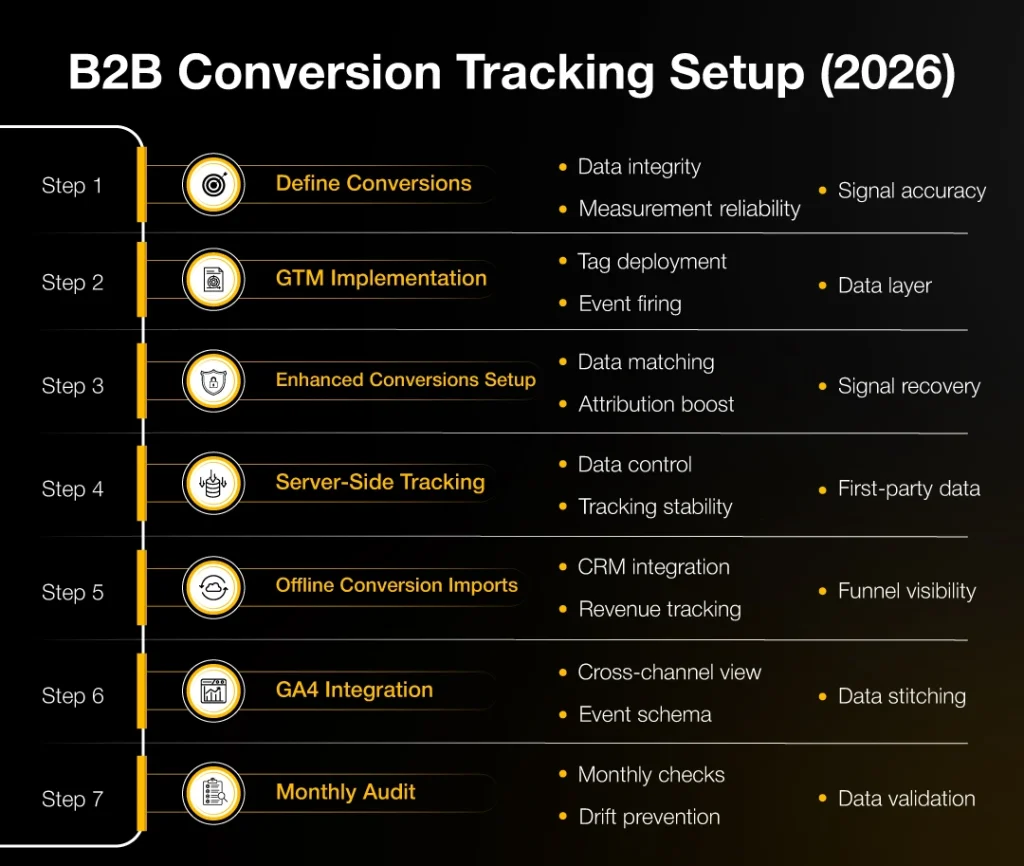
Step 1: define what counts as a conversion
B2B teams often track too many conversions or the wrong ones. Define a primary conversion (the one you optimise bidding against — usually demo request or qualified lead form) and several secondary conversions (newsletter, content download, pricing page view, video watch >50%).
Smart bidding optimises against your primary conversion. Make sure that conversion correlates with pipeline. If your primary conversion is ‘newsletter signup’ but your sales team only cares about demo requests, your bidding is optimising for the wrong thing — and you’ll see CPL drop while pipeline stagnates.
Best practice: pick one primary conversion, mark 3-5 events as secondary (visible in reports but not bidding signals), and explicitly exclude all other events from the conversion list to avoid noise.
Step 2: implement client-side via Google Tag Manager
Use Google Tag Manager to fire conversions on form submission, button click or thank-you page load. Avoid hard-coded conversion tags — they break too easily when developers update the site.
Test every conversion in Tag Assistant before going live. Half of broken tracking is detectable in the first 30 seconds of testing — fire the form, watch Tag Assistant, confirm the conversion event appears with the right parameters.
Use the dataLayer to pass form-fill metadata (form name, lead source, plan tier, etc.) along with the conversion. This data feeds GA4 and your CRM downstream.
Step 3: set up Enhanced Conversions
Enhanced Conversions sends hashed customer data (email, phone, name, address) to Google to improve match rates and bidding accuracy, especially in iOS-affected attribution windows. Implementation is via Tag Manager’s enhanced-conversions feature or via the Google Ads API.
Enhanced Conversions is critical for any B2B account in 2026. Accounts that implement it typically see 5-15% more conversions reported and meaningful improvement in smart-bidding accuracy. The implementation takes 2-4 hours; the impact is permanent.
Step 4: implement server-side tracking where possible
Server-side tracking (via Google Tag Manager Server Container or a CDP like Segment, RudderStack or Jitsu) is more reliable than client-side. It bypasses ad blockers and ITP restrictions, and gives more complete attribution data.
Server-side tracking is the single biggest reliability upgrade you can make in 2026. Expect 15-25% more conversions captured once it’s properly running, with better-quality first-party data flowing to all your ad platforms.
Setup takes 1-2 weeks for a team that hasn’t done it before, and ongoing maintenance is minimal. Worth every hour of effort.
Step 5: set up offline conversion imports
For B2B, the conversion that actually matters is closed-won — which happens weeks or months after the click. Offline conversion imports sync your CRM’s closed-won data back to Google Ads, letting smart bidding optimise against revenue, not just leads.
Connect HubSpot, Salesforce or your CRM via the Offline Conversions API or via Zapier as a starting point. Send back at least: lead-stage progressions (MQL → SQL → opportunity → closed-won), with timestamps and deal value.
This is where most B2B accounts under-invest. Without offline imports, Google’s smart bidding optimises against form fills — which is poorly correlated with revenue in B2B. With offline imports, smart bidding optimises against closed-won, which is exactly what you want.
Step 6: GA4 + cross-channel attribution
Set up GA4 properly with a recommended event schema. Enable Google Signals for cross-device tracking. Connect GA4 to Google Ads for cross-channel reporting. Set up custom dimensions for lead source, lead stage, and any other CRM fields you want to slice by.
GA4 won’t replace your CRM, but it gives you the cross-channel view that single-platform reporting can’t. Use it for executive reporting and channel-mix decisions, not for tactical bidding (which lives in Google Ads + your CRM).
Step 7: audit monthly
Set a monthly recurring audit: conversion volume vs CRM data, attribution windows, tag fire rates, server-side data flow, offline import success rate. Conversion tracking decays — code changes, CRM changes, browser updates, and platform changes all break things silently.
A 30-minute monthly audit prevents the kind of multi-quarter measurement drift that destroys account performance. Set a recurring calendar reminder.
Validation: how to know your tracking is right
Three checks confirm your tracking is correctly configured:
What to do when numbers don’t reconcile
If numbers diverge by more than 20%, you have a tracking issue. Most common causes: missing tag fires on certain pages, duplicate counting, attribution-window mismatches, or offline import failures. Investigate in this order: tag fires → duplicate counting → window mismatch → import success.
- Google Ads conversions vs GA4 conversions for the same event should be within 10% of each other.
- Google Ads conversions vs CRM new-lead count should be within 15% (some discrepancy is normal due to attribution windows).
- Offline conversions imported should match closed-won deals in your CRM at >95%.
FAQs
